Best Power Station for Working From Home
As an Amazon Associate I earn from qualifying purchases. Read our affiliate disclosure.
Top picks at a glance
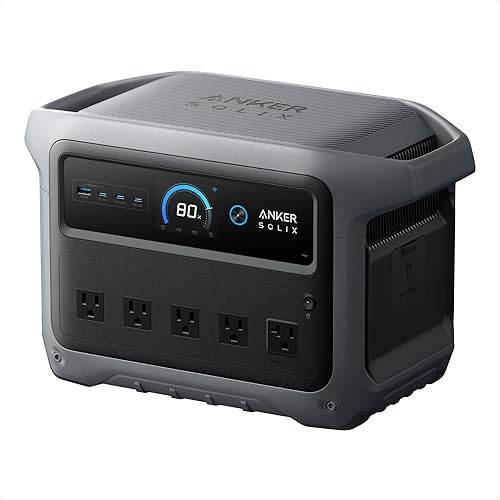 Best for most home officesAnker SOLIX C1000 Gen 2View on Amazon
 Best for a laptop and routerEcoFlow RIVER 3 PlusView on Amazon
 Best for multi-day outagesEcoFlow DELTA 3 PlusView on Amazon
For most people who work from home, the Anker SOLIX C1000 Gen 2 is the station to keep under the desk. It can carry a typical laptop, monitor, and router through a full workday, switches over in under 10 ms when the power drops, and lists just 20 dB of noise. If you only need your laptop and Wi-Fi for a few hours, the smaller EcoFlow RIVER 3 Plus is enough. For outages that can last days, the EcoFlow DELTA 3 Plus lets you add batteries.
Our picks rely on the specs Anker and EcoFlow published as of November 2026, plus the sample desk load described below. We haven’t used these stations in a home office of our own.
What a home office actually draws
A work-from-home setup is a light load compared with a fridge or a space heater. For our math, we assume this desk:
| Device | Assumed draw |
|---|---|
| Laptop charger | 65 W |
| External monitor | 25 W |
| Modem and router | 15 W |
| Total | 105 W |
These figures are our assumptions, not measurements. Check the labels on your own chargers and adapters, since a gaming laptop or a second monitor can double the total. A laptop also has its own battery, so in practice the station is often only topping it up.
Why switchover time matters at a desk
Most stations here offer a UPS-style mode. You leave your gear plugged into the station, and the station into the wall. When the grid drops, the station takes over. A laptop won’t notice either way, because of its own battery. The modem, router, and any desktop computer have no battery, so the gap matters for them.
All three picks list a switchover under 10 ms. Even so, a station isn’t a certified UPS, so test your own equipment by unplugging the station from the wall before you rely on it.
Home office power stations compared
| Model | Capacity | AC output | UPS switchover | Listed noise | Weight | Hours at 105 W |
|---|---|---|---|---|---|---|
| Anker SOLIX C1000 Gen 2 | 1,024 Wh | 2,000 W | Under 10 ms | 20 dB | 24.9 lb | About 8.3 |
| EcoFlow RIVER 3 Plus | 286 Wh | 600 W | Under 10 ms | Under 30 dB | 10.4 lb | About 2.3 |
| EcoFlow DELTA 3 Plus | 1,024 Wh, expandable to 5 kWh | 1,800 W | Under 10 ms | 30 dB | 27.6 lb | About 8.3 |
Runtime assumes 85% of each battery reaches the desk, with the 105 W load above running the whole time.
Anker SOLIX C1000 Gen 2: best for most home offices
At our sample load, the C1000 Gen 2 lasts about 8.3 hours, roughly one workday. Its 20 dB listed noise is the lowest of the three, which helps when it sits beside you on calls. When power returns, Anker lists a full wall charge in 49 minutes, so it’s ready again quickly.
It can’t grow. Anker says there’s no expansion feature, so if outages in your area run past a day, look at the DELTA 3 Plus.
Anker SOLIX C1000 Gen 2
- Capacity
- 1,024 Wh
- AC output
- 2,000 W
- Solar input
- 600 W
- Weight
- 24.9 lb
Who it's for: People who want about 1 kWh and 2,000 W in a portable box, and don't need to add batteries.
Strengths
- 49-minute full AC charge
- 2,000 W output, 3,000 W peak
- Rated to keep 80% capacity after 4,000 cycles
Weaknesses
- Not expandable
- Lower solar input than the DELTA 3 Plus
EcoFlow RIVER 3 Plus: best for a laptop and router
If your laptop battery covers most of the day, the station only needs to keep Wi-Fi up. A 15 W modem and router alone would run for about 16 hours on the RIVER’s usable energy. With the full 105 W desk, it lasts a little over 2 hours.
At 10.4 lb, it’s easy to move between rooms. EcoFlow sells an Extra Battery that takes it to 858 Wh, though its 600 W output limit stays the same.
EcoFlow RIVER 3 Plus
- Capacity
- 286 Wh
- AC output
- 600 W
- AC charge
- 1 hour
- Weight
- 10.4 lb
Who it's for: People who mainly charge phones and laptops or keep Wi-Fi on, and want a station that's easy to carry.
Strengths
- Easy to carry at 10.4 lb
- Expandable to 858 Wh
- Listed at under 30 dB
Weaknesses
- Small capacity for high-power devices
- 600 W limits what you can run
EcoFlow DELTA 3 Plus: best for multi-day outages
The DELTA 3 Plus matches the C1000 Gen 2’s capacity at the start, then expands to 5 kWh. At that size, our 105 W desk could run for around 40 hours, enough for several workdays. Its 1,000 W solar input also helps if you have panels to recharge between days.
It weighs 2.7 lb more than the Anker and lists 30 dB, so it may be easier to hear in a quiet room.
EcoFlow DELTA 3 Plus
- Capacity
- 1,024 Wh
- AC output
- 1,800 W
- Solar input
- 1,000 W
- Weight
- 27.6 lb
Who it's for: Campers and van owners who want fast recharging, strong solar input, and the option to add batteries later.
Strengths
- Expandable to 5 kWh
- 1,000 W of solar input
- Full charge in about 1.3 hours from an 800 W car source
Weaknesses
- Fast car charging needs a separate Alternator Charger
- 1 kWh base capacity is modest for full-time use
How to choose
- Add up your desk. Read the wattage on each charger and adapter, then total them.
- Decide how long you need to work. For a few hours of Wi-Fi, the RIVER 3 Plus is enough. For a full day, look at a 1 kWh station.
- Check for a desktop computer. Desktops and external drives have no battery of their own, so the switchover time and a proper test matter more.
- Think about longer outages. If your area loses power for days, choose a station that takes extra batteries, like the DELTA 3 Plus.
For outages that also involve the fridge and lights, see our power outage picks. If you rent and have limited space, read our apartment picks.
FAQ
How big a power station do I need to work from home during an outage?
For a laptop, one monitor, and a router drawing about 105 W, a 1 kWh station like the Anker C1000 Gen 2 lasts about 8 hours. That assumes 85% efficiency. Add up your own devices’ wattage to get your number.
Can a portable power station replace a UPS for my computer?
It can act like one. The Anker C1000 Gen 2, EcoFlow RIVER 3 Plus, and EcoFlow DELTA 3 Plus all list a switchover under 10 ms. They aren’t certified UPS units, though, so test your own computer before you rely on one.
Will a power station be too loud on video calls?
Probably not at light loads. Anker lists 20 dB for the C1000 Gen 2, and EcoFlow lists under 30 dB for the RIVER 3 Plus and 30 dB for the DELTA 3 Plus. Those listed figures may not reflect noise while charging or under heavy loads.
Can I keep my home office running for several days?
Yes, with enough capacity. The EcoFlow DELTA 3 Plus expands to 5 kWh, which could run a 105 W desk for about 40 hours at 85% efficiency. Solar panels can extend that further between days.