Best Battery Generator for Apartment Living
As an Amazon Associate I earn from qualifying purchases. Read our affiliate disclosure.
Top picks at a glance
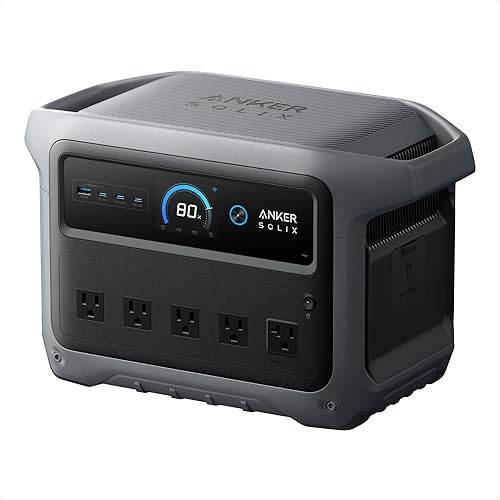 Best for most apartmentsAnker SOLIX C1000 Gen 2View on Amazon
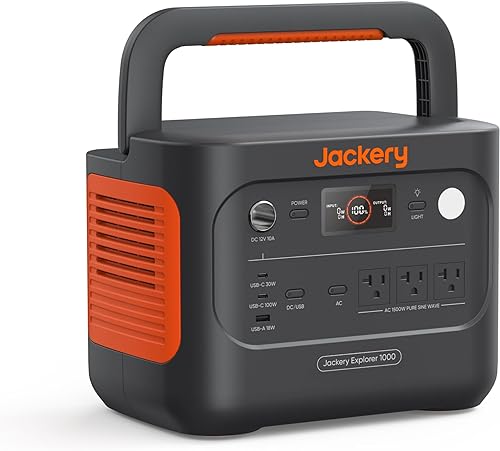 Lightest 1 kWh optionJackery Explorer 1000 v2View on Amazon
 Best for small spacesEcoFlow RIVER 3 PlusView on Amazon
For most apartments, we’d choose the Anker SOLIX C1000 Gen 2. It’s light enough to carry, stores enough energy for a long outage, and recharges in under an hour.
We chose these apartment picks from published specs in November 2026, and we haven’t tested any of them.
Why apartments need a battery
Gas generators aren’t an option for apartment living. The US Consumer Product Safety Commission says to run them outdoors only, at least 20 feet from a home, and not on a porch. Battery power stations produce no exhaust, so you can use them indoors.
Check your lease and building rules before you buy, as some have rules about large batteries.
Quick comparison
| Model | Capacity | AC output | UPS switchover | Weight |
|---|---|---|---|---|
| Anker SOLIX C1000 Gen 2 | 1,024 Wh | 2,000 W | Under 10 ms | 24.9 lb |
| Jackery Explorer 1000 v2 | 1,070 Wh | 1,500 W | Under 20 ms | 23.8 lb |
| EcoFlow RIVER 3 Plus | 286 Wh | 600 W | Under 10 ms | 10.4 lb |
How long each one lasts
These estimates assume 85% efficiency. A router and modem are assumed to draw 15 W, and a laptop 60 W.
| Model | Router and modem | Router, modem, and laptop |
|---|---|---|
| Anker SOLIX C1000 Gen 2 | About 58 hours | About 11.6 hours |
| Jackery Explorer 1000 v2 | About 60 hours | About 12 hours |
| EcoFlow RIVER 3 Plus | About 16 hours | About 3.2 hours |
Anker SOLIX C1000 Gen 2: best for most apartments
Anker lists a full AC charge in 49 minutes, which helps if power returns only briefly. It has a 2,000 W output and is rated to keep at least 80% of its capacity after 4,000 cycles.
Anker SOLIX C1000 Gen 2
- Capacity
- 1,024 Wh
- AC output
- 2,000 W
- Solar input
- 600 W
- Weight
- 24.9 lb
Who it's for: People who want about 1 kWh and 2,000 W in a portable box, and don't need to add batteries.
Strengths
- 49-minute full AC charge
- 2,000 W output, 3,000 W peak
- Rated to keep 80% capacity after 4,000 cycles
Weaknesses
- Not expandable
- Lower solar input than the DELTA 3 Plus
Jackery Explorer 1000 v2: lightest 1 kWh option here
It’s slightly lighter and holds slightly more than the Anker. Its output is lower, however, and its cycle rating is listed as 4,000 cycles to 70% or more, which isn’t directly comparable with Anker’s 80% rating.
Jackery Explorer 1000 v2
- Capacity
- 1,070 Wh
- AC output
- 1,500 W
- Solar input
- 400 W
- Weight
- 23.8 lb
Who it's for: Campers who want about 1 kWh at a low weight and don't run appliances over 1,500 W.
Strengths
- Lightest 1 kWh model we compare
- LiFePO4 battery
- 3,000 W surge rating
Weaknesses
- Lower AC output than the Anker C1000 Gen 2
- Cycle rating is listed to 70% or more, not 80%
EcoFlow RIVER 3 Plus: best for small spaces
This is a good fit if you only want to keep Wi-Fi and a laptop going. EcoFlow lists operation below 30 dB. Capacity can grow to 858 Wh with an extra battery.
EcoFlow RIVER 3 Plus
- Capacity
- 286 Wh
- AC output
- 600 W
- AC charge
- 1 hour
- Weight
- 10.4 lb
Who it's for: People who mainly charge phones and laptops or keep Wi-Fi on, and want a station that's easy to carry.
Strengths
- Easy to carry at 10.4 lb
- Expandable to 858 Wh
- Listed at under 30 dB
Weaknesses
- Small capacity for high-power devices
- 600 W limits what you can run
A note on UPS mode
UPS mode switches your devices to battery when wall power fails. The switchover figures above come from manufacturers. For a desktop computer or anything that can’t tolerate a brief gap, test the setup before you rely on it.
To estimate your own devices, use the runtime calculator.
How to choose
- List what must stay on. For Wi-Fi and a laptop, the RIVER 3 Plus may do. For more than that, choose a 1 kWh model.
- Think about stairs and storage. If you have no elevator, the 10.4 lb RIVER 3 Plus is far easier to move.
- Check your output needs. The Anker’s 2,000 W gives you the most room for small appliances.
- Read your lease. Some buildings have rules about large batteries.
FAQ
Can I use a battery generator inside my apartment?
Yes. Battery power stations produce no exhaust. Check your lease and building rules first.
Which one is quietest?
Anker lists 20 dB, Jackery lists 30 dB, and EcoFlow lists under 30 dB. Makers may not measure in the same way, so treat these as rough figures.
Will UPS mode protect a desktop computer?
The makers list a switchover of under 10 ms for the Anker and EcoFlow, and under 20 ms for the Jackery. Test your own setup before you rely on it.


